Database
The database setting is opened via
The settings, preferences and info icon  in the main menu
Selecting the Settings tab
Selecting the Databases tab
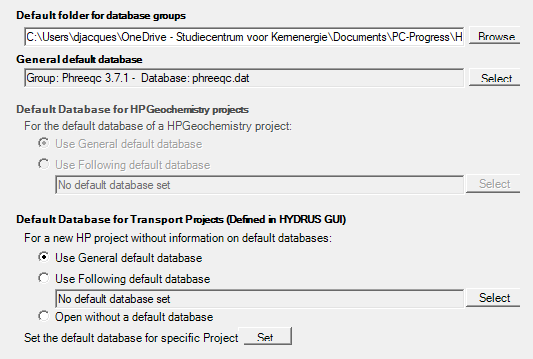
Default folder for database groups
The textbox shows the folder that is used as the default folder when a new database group is created. When a new database group is created via the Database Manager, the default folder for the database group is used when the user selects the default folder check box in the Metadata form for a new database groups.
General default database
The textbox shows the database group and database that is used as a general default database. The general default database is selected via the Select button which opens the Database Manager.
Default database for HPGeochemistry projects
(only enabled for HPGeochemistry)
The user defines the database default that will be used for new simulation case with a choice between the general default database or a default database for the HPGeochemistry projects only set via the Select button which opens the Database Manager.
For each specific HPGeochemsitry project, the default database can be redefined via the Metadata form for a project. This form allows also for choosing if the general or the project default database is used for new simulation cases. It is also possible to have no default database in a given project.
When a new simulation case is created, the database is defined according to the project settings. It is possible to overwrite these project settings by selection of a specific database for a given simulation case via the Database Panel in the Input Work Space.
Default database for Transport Projects
(only enabled for HP-Input launched via the HYDRUS graphical user interface)
The project manager of the HYDRUS graphical user interface allows for defining project groups. The user can link a default database for new HP projects within a project group. Following options are availablew
- Use the general default database
- Use a default database for the HP projects. This default database is selected via the Select button which opens the Database Manager.
- The new project is initiated without a default database
In addition, the user can define a specific default database for each project group via the button Set (for a new project group, the user will be asked to indicate if a specific default database is linked to the project group).
Note that project groups are identified via their absolute path. If the user changes the path in the project manager of the HYDRUS graphical user interface, the information on the default database when a new project is initiated is lost.