Metadata Form
The metadata form allows for defining manager object (Project, Simulation case, Database) and to add additional information. An example for a new simulation case is shown below. The active input is slightly different between the different objects, but the information is in general the same (see subsections under Project Manager and Database Manager)
The Name and Folder is key information, although not always enabled. Most of the other information is optional.
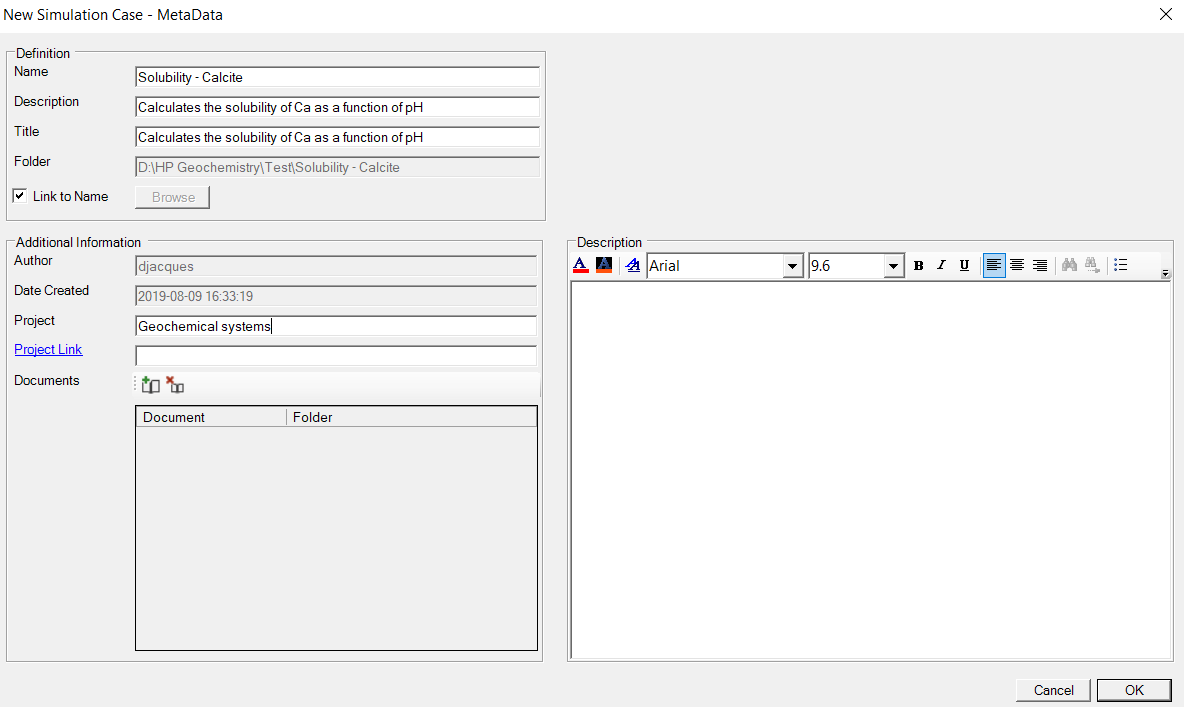
Definition group
|
Name |
Name of the object. By default, the name is also used in the folder name. |
|
Description |
Description of the object. The description is also shown in the object managers. |
|
Title |
Title of the object. |
|
Folder |
Folder of the object. Depending on the object and the previous action, the textbox is enabled or not. For example, when editing a simulation case object or adding a database, the folder is defined by, respectively, its initial definition or by the folder of the database group. The Browse button initiates a "Browse to Folder" dialogue window. |
|
Link to Name |
When checked, the folder for the object is defined automatically. For example, for a simulation case, the folder is defined by the folder of the project and the name of the simulation case. |
Additional information
|
Author |
The author name is filled in automatically when a new object is made. The current window user is used as the author. |
|
Date Created |
The date at which the object is created is automatically filled in. The current time is used. |
|
Project |
Name of the project. |
|
Project Link |
An external link to the project or any other subject. The link can be to a folder, webpage or location in a document management system. By clicking project link, the folder of webpage is opened externally. |
|
Documents |
Documents can be added and opened in external windows. For example, Word files can be added and will opened in Microsoft Word. |
|
|
Add a document to the Document list. A file browser dialogue window opens. |
|
|
Remove a document from the Document list. |


Description
A more elaborated description of the object can be added to the Description group.
Specific Information