Add Aqueous Species
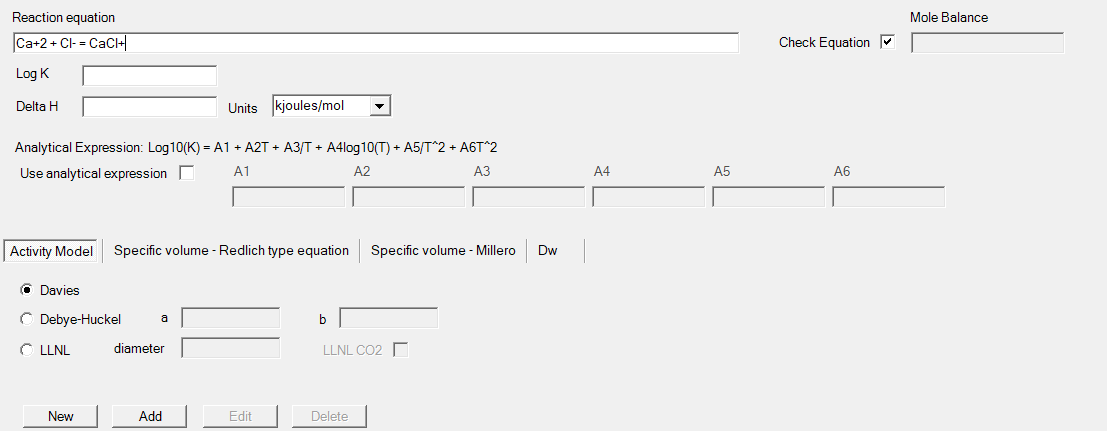
The form below is used to define new aqueous components. It replaces the solution_species definition in the text input files.
|
Reaction equation |
Reaction equation for the aqueous species. The aqueous species is the first species at the right hand-side of the equation. The graphical user interface will check if the reaction equation is elemental and charge balanced and the equation can be parsed (i.e. no invalid aqueous components). As long as this is not the case, the title Reaction equation will be coloured orange, and the tooltip will indicate what is incorrect. If it is correct, the title is black and the other fields are enabled. If Check equation is deselected, the reaction equation is not checked for charge and elemental balance. |
|
Check equation |
Check if the reaction equation is elemental and charge balanced. If no check is required, the Mole Balance field is used to define the atoms of each element to be included in the mole balance equations. |
|
Mole Balance |
|
|
Chemical formula |
Primary master species Information used to calculate gram formula weight, which is used to convert input data from mass units to mole units: If "Use chemical formula" is checked, a chemical formula is required. If "Use chemical formula" is unchecked, the gram formula weight is required: If "Gram formula weight equal to weight of element" is checked: Disabled, the weight in the box "Gram formula weight of pure element" is used is unchecked: Enabled, numerical value required. Secondary master species Chemical formula used to calculate gram formula weight, which is used to convert input data from mass units to mole units |
|
Gram formula weight of pure element |
Primary master species The gram formula weight for the pure element (g/mol). This field is required (enabled) only for primary master species. Secondary master species - Label changes to "Gram formula weight". Default value used to convert input data in mass units to mole units for the element or element valence This field is required (enabled) for a secondary master species when "Use chemical formula" is unchecked. |
|
Use chemical formula |
To indicate if a chemical formula is used to calculate the gram formula weight to convert input data in mass units to mole units for the element or element valence. |
|
Gram formula weight equal to weight of element |
For primary master species and when gram formula weight is given instead of a formula to calculate the gram formula weight If checked, the "Gram formula weight of pure element" is used as the gram formula weight. |
|
Include default identity reaction |
If checked, the identity reaction for primary master species is included in the data block solution_species data block: If unchecked, the identity reactions should be included in the text files or via the form for defining Aqueous species. If Master Species is Ms+ then following reaction is included under solution_species: Ms+ = Ms+ -log_k 0.0 This check box is only available for primary master species. If other information should be included (e.g., species volume, activity model), this box should be unchecked, and the user should include the information using the Aqueous species form or in the text file under solution_species. |