Porosity (scaling factor of water content)
In the water flow and solute transport model, the actual porosity (actual saturated water content) as a function of the spatial coordinates and times is calculated based on the reference saturated and residual water content for the specific material type of the node and the nodal value of the scaling factor for the water content αθ [-].
On this page, we illustrate how:
- you can calculate porosity using script functions
- you can calculate and update the scaling factors of the water content
- you define the porosity and scaling factors of the water content at the initial time
- you account for evolving porosity and scaling factors with time in the water flow and solute transport model
Calculate porosity
HPx does not automatically calculate the change in porosity when the volume of solid phases changes. The user needs to explicitly define a script that calculates the porosity based on the volume of the different solid phases. Typically, the sum of the volume of the solid phases is given by:
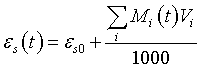
where
|
εs |
Solid phase content |
|
t |
Time |
|
εs0 |
Inert solid phase content |
|
Mi |
Moles of the ith mineral (mole/dm³) |
|
Vi |
Molar volume of the ith mineral (cm³/mole) |
The volume that is used in the geochemical calculation in HPx for each node is 1 dm³. The porosity, η, is then given as:
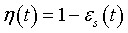
Note: in the HYDRUS codes, the porosity is defined as the saturated water content, θs.
One option is to use the script function sys(). Hereunder, an example is given for a case in which all solid phases are minerals in equilibrium with the aqueous solution (defined with equilibrium_phases) and assuming that the database contains information of the mineral volumes (-vm in PHASES).
|
MyBasic] VolumeSolidPhases = 0 res=sys("equi","count","name$","type$","moles") if(count>0) then for i = 1 to count if (string.find(name$(i),"(g)")=-1) then VolumeSolidPhases = VolumeSolidPhases + equi(name$(i))*phase_vm(name$(i)) endif next endif porosity = 1 - VolumeSolidPhases/1000 |
Since the volume used in the geochemical calculations is 1 dm³, the value that is returned by the script function equi() has as unit mol / dm³. When phase_vm() has as unit cm³/mol, the unit of equi()*phase_vm() is cm³/dm³.
The porosity of a given node is changed by the script function change_por():
|
[MyBasic] change_por(porosity) |
Calculate scaling factor for water content
The porosity is transformed to the scaling factor of the water content by the reference residual and saturated water content of the material type in the corresponding node.
The most straightforward method is to use update_sfwater(). Assuming that porosity is the name of the variable storing the value of the porosity:
|
[MyBasic] update_sfwater(porosity) |
Alternatively, the scaling factor of the water content is calculated explicitly using transprop() and change_sfwater():
|
[MyBasic] ths = transprop("ths") thr = transprop("thr") sfwc = (porosity - thr) / (ths - thr) change_sfwater(sfwc) |
Setting the porosity and scaling factor for water content at the initial time
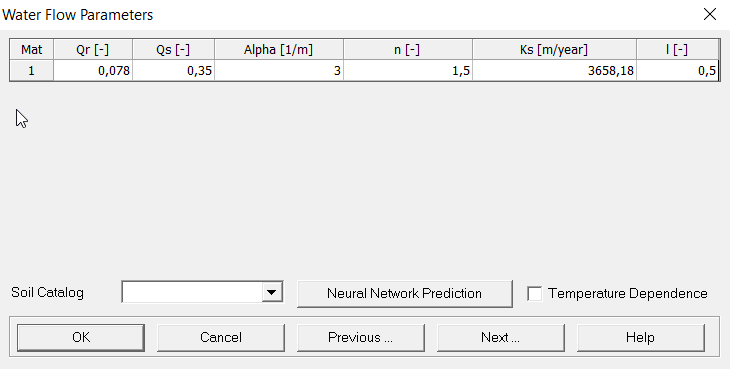
The reference saturated and residual water content are time-invariant, material dependent variables. The reference saturated and residual water content for a given material type are defined in the Water Flow - Soil Hydraulic Parameters pre-processing dialogue window of the HYDRUS graphical user interface (Qs and Qr in the figure below)
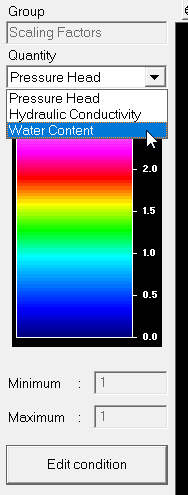
The initial values of the scaling factor of the water content can be set in following ways:
The Soil Profile - Graphical Editor or Soil Profile - Summary pre-processing dialogue windows of the HYDRUS graphical user interface
Via the Soil Profile - Graphical Editor, use following commands:
Conditions -> Scaling Factor -> Water Content
Click Edit condition (see figure below)
Select nodes and set the values for selected top and bottom node
or
Select "scaling factors" from toolbar (see figure below)
Select "water content" (see figure belwo
Click Edit condition (see figure below)
Select nodes and set the values for selected top and bottom node

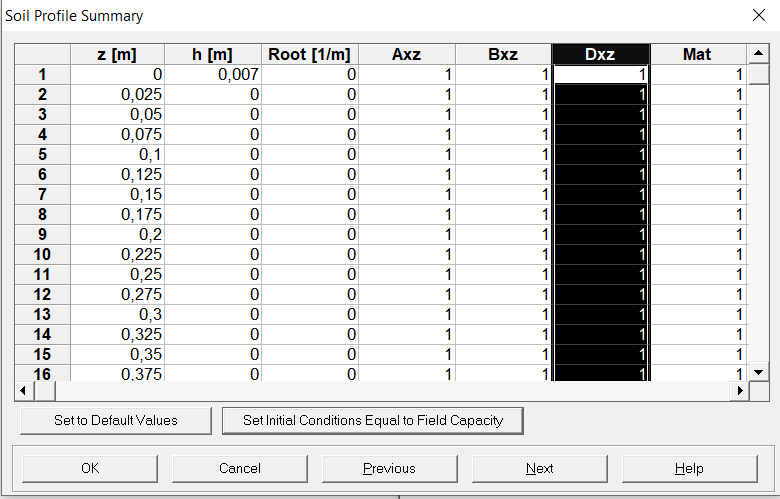
Via the Soil Profile - Graphical Summary:
Nodal values for the scaling factor of the water content at the initial time are defined in the column with heading Dxz (see figure below)
The Project Navigator
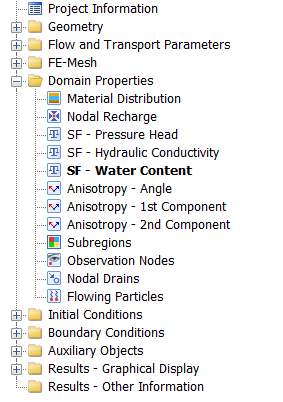
Via Domain Properties -> SF - Water Content (see figure below)
Initial calculations using calculated_values in geochemistry input
With -state initial, the script is executed once at the beginning for the transport simulations for each node. This option can be used to calculate the values of the scaling factor of the water content at initial time. The script functions change_por0() and change_por() are used to change the value of the porosity and the porosity at the initial time (to keep the initial value). Important: changing the porosity will not effect the properties in the flow and transport model. To change the transport properties in the flow and transport model, the values of the scaling factor of the water content should be changed. The script functions update_sfwater(), change_sfwater(), and change_sfwater0() are used to change the values of the scaling factor of the water content; the latter to change the value at the initial time. The first one has (actual) porosity as argument and the scaling factor of the water content is calculated using the reference saturated and residual water content. The other two have the value of the scaling factor of the water content as argument.
The example below illustrates how to set the values for porosity and the scaling factor for the water content assuming that the porosity has been calculated and stored as the variable porosity.
|
-state initial #statements to calculate porosity #... #porosity = ... |
Changing porosity and scaling factor for water content with time
To use the updated scaling factor of the water content in the water flow and solute transport model, one needs to:
- calculate and update the scaling factor
- indicate that the porosity and the scaling factor of the water content change during the flow and transport simulation
Calculate and update the scaling factor
After the geochemical calculations in each time step and for each node, the porosity change needs to be calculated and the scaling factor needs to be updated. The scripts associated with -state update of the calculated_values data block are executed for each node after the geochemical calculations in each time step.
|
-state update #statements to calculate porosity #... #porosity = ... |
Indicate evolving using updated transport properties in the flow and transport model
To indicate that a changed porosity and scaling factor of the water content has to be used, -update hp in reactive_transport is set true.
Alternatively, the option for updating hydraulic parameters (check Evolving Transport Properties; check Hydraulic Properties) can be selected in the Model options->Evolving transport properties form of the Reactive Transport Panel.
If "Use Tortuosity_Factor" is selected in the Solute transport - General Information pre-processing dialogue window of the graphical user interface of HYDRUS, the updated porosity is used in the selected tortuosity model. In any case, the updated porosity is used in the solute transport equations via e.g. the calculation of the dispersion coefficient.
Important: The scaling factors of the water content are only updated with the statements update_sfwater() or change_sfwater(). The updated values are only used in the water flow and solute transport model with the identifier -update hp true.
Examples
Examples
Section Reactive transport with evolving transport properties
1D - Equilibrium - Calcite dissolution
1D - Equilibrium - Calcite dissolution and gypsum precipitation
Verification
Section Evolving properties of the porous media
1D - Kinetics - Calcite dissolution