Edit Graph Tool
The Edit Graph Tool is accessible via two (mutually exclusive) ways by clicking the Edit Graph Tool Icon  :
:
- When only one graph is displayed in the Graph Navigation Panel - Select the Edit Graph Tool Icon at the top.
- When the Graph Navigation Panel is active, select the Edit Graph Tool Icon in the Single Graph Panel.
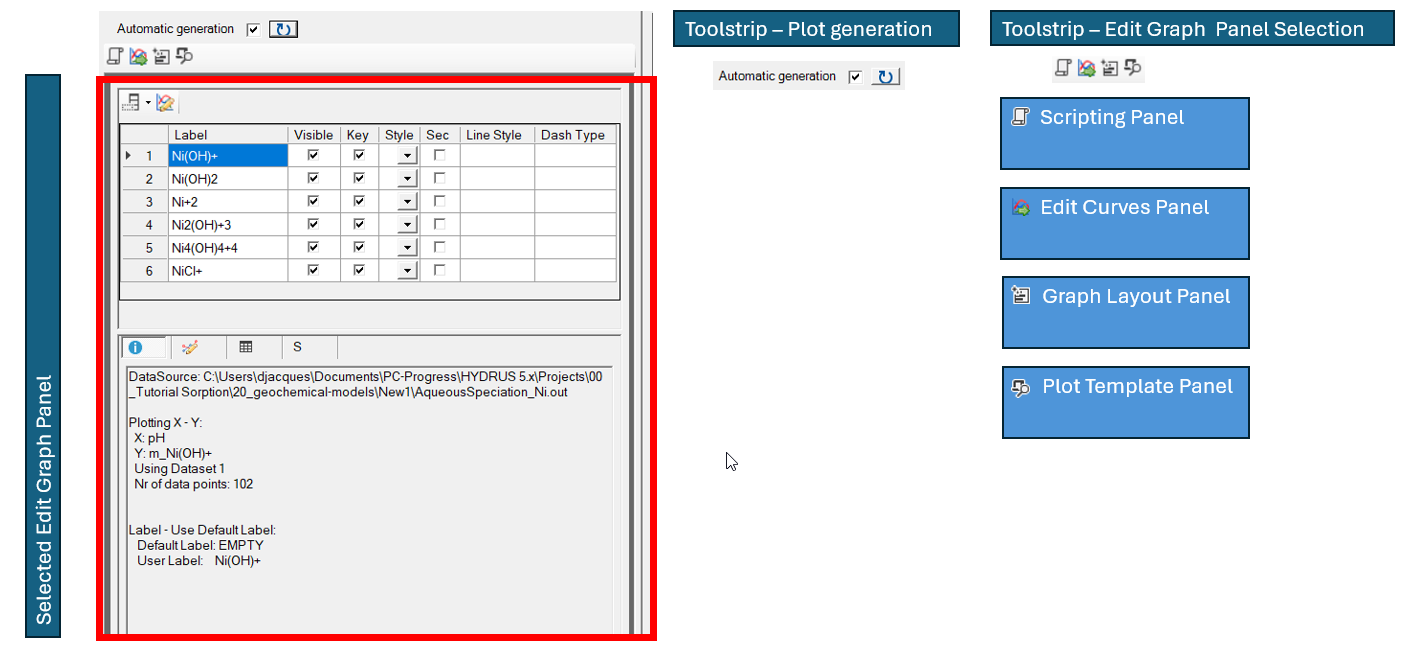
The Edit Graph Tool has:
- A tool strip for plot generation
- A tool strip to select a Edit Graph Panel
- An area that display the selected Edit Graph Panel

|
|
|
|
|
|
Tool Strip Edit Graph Panel Selection

|
|
Select the Scripting Panel. It consists of a text field to include Gnuplot commands - most of the Gnuplot commands will work. The commands that are defined in this panel are included in the Gnuplot Plot Script File just before export and plot definitions in the script file. |
|
|
Select Edit Curves Panel to edit properties of individual curves in the plot. The panel gives also information on the data for the individual curves. |
|
|
Select Graph Layout Panel to edit properties of the plot. Only a limited amount of gnuplot options are provided in this panel. Additional properties can be changed via the Scripting Panel. |
|
|
Select Plot Script Panel. It contains a read-only transcript of the script to generate the plot via Gnuplot. The script consists of:
|


